

Diese Seite wurde automatisch übersetzt. Es kann daher zu Abweichungen oder Ungenauigkeiten im Text kommen. Verbindlich ist ausschließlich die Originalfassung. Rechtsansprüche aus Inhalten der übersetzten Version sind ausgeschlossen.

Competition

Added value for all generations

It is intended to enhance the neighbourhood and the entire city and become an attraction for citizens of all ages: The plans for the Bürgerpark Sickergrund are becoming more concrete. A thirteen-member jury selected a winner in a competition in mid-October. The award ceremony took place on 30 October.

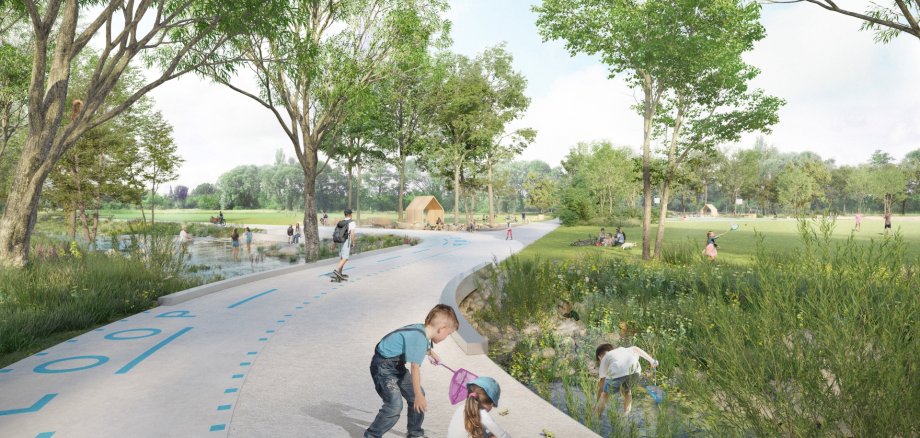
The construction of the bike park just above the Sickergrundhalle was a kind of initial spark for the further development of the area around the stadium with its sports fields. The city organised a design competition in which eleven landscape architects and planning offices from all over Germany took part. In the end, the jury decided in favour of the proposal from the specialist firm "QUERFELDEINS" from Dresden. Its major advantage: the recreational area begins at the forecourt of the sports hall and combines new sports facilities with recreational areas. In addition, the streams will be renaturalised and made tangible through walking paths. The centre and connecting element is the approximately 1.5 km long and two and a half metre wide circular path (loop), which can be used by walkers, joggers, cyclists, inline skaters and wheelchair users alike. This also creates a link between the housing estate and the River Main.

At the award ceremony, Mayor Astrid thanked the architects and urban planners Schirmer from Würzburg for the professional organisation of the competition and expressed her conviction that the implementation of the winning design would mean tangible added value for all generations and the entire region. Head of the building authority Oliver Graumann spoke of a unique opportunity to quickly upgrade the area thanks to the generous funding.

The plans can be viewed online at www.wettbewerb-sickergrund-kitzingen.mypinion.de.

Help with accessibility

  • General

    We endeavour to make our website accessible. You can find details on this in our accessibility statement. You can send us suggestions for improvement via our feedback form Report accessibility.

  • Font size

    To adjust the font size, please use the following key combinations:

    Larger

    command
    +

    Smaller

    command

    Larger

    Ctrl
    +

    Smaller

    Ctrl
  • Keyboard navigation

    Use TAB and SHIFT + TAB to navigate through next/previous links, form elements, and buttons.

    Use ENTER to open links and interact with elements.

  • Contrast mode

    Press the following key combination to reduce or increase the contrast:

    Enlarge

    control
    option
    command
    .

    Decrease

    control
    option
    command
    ,
    Note: The shortcuts must be activated in the system settings of the operating system.

    Press the left ALT key + left SHIFT key + PRINT to quickly turn high contrast mode on or off.

  • Invert colours

    Press the following key combination to switch the colour inversion on and off:

    control
    option
    command
    8
    Note: The shortcuts must be activated in the system settings of the operating system.

    First activate the screen magnifier and then switch the colour inversion on and off with the following key combinations:

    1. screen magnifier

    +

    2. invert colours

    Ctrl
    Old
    I
  • Screen magnifier

    Press the following key combinations to use the screen magnifier:

    Switch on/off

    option
    command
    8

    Enlarge view

    option
    command
    =

    Zoom out view

    option
    command
    Note: The shortcuts must be activated in the system settings of the operating system.

    Switch on / Enlarge view

    +

    Zoom out view

Select language