Diese Seite wurde automatisch übersetzt. Es kann daher zu Abweichungen oder Ungenauigkeiten im Text kommen. Verbindlich ist ausschließlich die Originalfassung. Rechtsansprüche aus Inhalten der übersetzten Version sind ausgeschlossen.

Volunteering

Farewell after more than 40 years

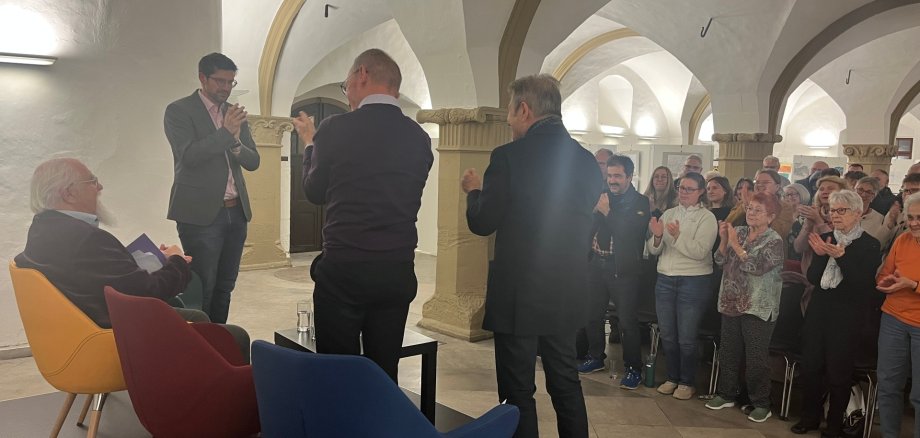
At the end, there was a standing ovation; the applause seemed to go on forever. Helmut Fuchs was bid farewell after more than 40 years as director and the driving force behind the Kitzinger Häckerchronik. Dieter Brückner has been confirmed as his successor. The people of Kitzing can look forward to new performances in 2030.

Surrounded by his ‘Häcker family’, Helmut Fuchs was presented on Wednesday evening, 18 November, with a certificate of appreciation and a photo album featuring the finest images from 45 years of the Häcker chronicle. Mayor Walter Vierrether thanked him for decades of service “carried out with such passion”.

Since 1981, Helmut Fuchs has continuously developed the chronicle, adding new scenes and supporting generations of amateur actors. He organised costumes, liaised with the local council and founded the Häckerbühne association. He also weathered difficult times, such as the COVID-19 pandemic, with great dedication. However, he does not wish to bid farewell to the stage entirely: he intends to continue playing a key role as director in the Häckerbühne’s annual performances.

In Dieter Brückner, a successor has been found who grew up in Kitzingen and worked as a teacher and headteacher in several Bavarian towns. Throughout this time, he also always led school theatre groups. He now lives back in his home town. He admitted in the town hall that he had initially hesitated when asked to take on the direction of the *Häckerchronik*. However, the idea of getting involved in Kitzingen and trying something new had increasingly appealed to him.

Brückner would like to develop the chronicle carefully, preserving its essence whilst shortening the performance, which has so far lasted around three and a half hours. In doing so, he wants to involve as many people as possible and also make room for modern elements. “It certainly won’t be a one-man show,” he promised.

Preparations for 2030 are now getting under way with the development of a new concept. The aim remains the same: to keep Kitzingen’s history alive. Or, as Helmut Fuchs put it when he stepped down: “Yesterday is a mandate for tomorrow.”

Help with accessibility

  • General

    We endeavour to make our website accessible. You can find details on this in our accessibility statement. You can send us suggestions for improvement via our feedback form Report accessibility.

  • Font size

    To adjust the font size, please use the following key combinations:

    Larger

    ⌘command
    +

    Smaller

    ⌘command
    –

    Larger

    Ctrl
    +

    Smaller

    Ctrl
    –
  • Keyboard navigation

    Use TAB and SHIFT + TAB to navigate through next/previous links, form elements, and buttons.

    Use ENTER to open links and interact with elements.

  • Contrast mode

    Press the following key combination to reduce or increase the contrast:

    Enlarge

    ⌃control
    ⌥option
    ⌘command
    .

    Decrease

    ⌃control
    ⌥option
    ⌘command
    ,
    Note: The shortcuts must be activated in the system settings of the operating system.

    Press the left ALT key + left SHIFT key + PRINT to quickly turn high contrast mode on or off.

  • Invert colours

    Press the following key combination to switch the colour inversion on and off:

    ⌃control
    ⌥option
    ⌘command
    8
    Note: The shortcuts must be activated in the system settings of the operating system.

    First activate the screen magnifier and then switch the colour inversion on and off with the following key combinations:

    1. screen magnifier

    +

    2. invert colours

    Ctrl
    Old
    I
  • Screen magnifier

    Press the following key combinations to use the screen magnifier:

    Switch on/off

    ⌥option
    ⌘command
    8

    Enlarge view

    ⌥option
    ⌘command
    =

    Zoom out view

    ⌥option
    ⌘command
    –
    Note: The shortcuts must be activated in the system settings of the operating system.

    Switch on / Enlarge view

    +

    Zoom out view

    –