Diese Seite wurde automatisch übersetzt. Es kann daher zu Abweichungen oder Ungenauigkeiten im Text kommen. Verbindlich ist ausschließlich die Originalfassung. Rechtsansprüche aus Inhalten der übersetzten Version sind ausgeschlossen.

Jorinde and Joringel
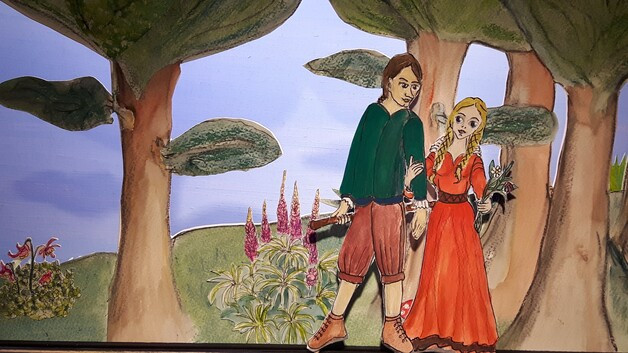
The paper figures Jorinde and Joringel in front of a forest backdrop.
Family & Children

Category: Family & Children

Jorinde and Joringel

Gabriele Brunsch retells this rather short Grimm’s fairy tale in a completely fresh and enchanting way. Set in a Franconian fantasy landscape of deciduous woodland and soft colours, one is tempted to believe that the world is good and beautiful. Yet one soon realises that here, in this region, people have been haunted time and again by dark shadows for hundreds of years, and one suspects that it might have something to do with the castle standing high up in the forest. There lives a sorceress who possesses infinitely evil powers.
She enchants all maidens who come within a hundred paces of the castle, turning them into birds. She then locks them in a cage.

No one had ever escaped her power. Will Joringel succeed in freeing his Jorinde from the sorceress’s clutches?

The magnificent musical accompaniment to the story was created by harpist Julia Rosenberger, featuring her own compositions and sound effects.

12 acts with over 50 performers – 45 mins – ages 8 and up

Date: 25 April 2026

Time: from 5.00 pm

Adults: 10 € | Children 8 €
Tickets at the box office

Organiser

Paper theatre Kitzingen

...a place of magic...

papiertheatre-kitzingen.de

Contact us

Gabriele Brunsch

+4993328692

gabriele.brunsch@t-online.de

  • Paper theatre

Help with accessibility

  • General

    We endeavour to make our website accessible. You can find details on this in our accessibility statement. You can send us suggestions for improvement via our feedback form Report accessibility.

  • Font size

    To adjust the font size, please use the following key combinations:

    Larger

    command
    +

    Smaller

    command

    Larger

    Ctrl
    +

    Smaller

    Ctrl
  • Keyboard navigation

    Use TAB and SHIFT + TAB to navigate through next/previous links, form elements, and buttons.

    Use ENTER to open links and interact with elements.

  • Contrast mode

    Press the following key combination to reduce or increase the contrast:

    Enlarge

    control
    option
    command
    .

    Decrease

    control
    option
    command
    ,
    Note: The shortcuts must be activated in the system settings of the operating system.

    Press the left ALT key + left SHIFT key + PRINT to quickly turn high contrast mode on or off.

  • Invert colours

    Press the following key combination to switch the colour inversion on and off:

    control
    option
    command
    8
    Note: The shortcuts must be activated in the system settings of the operating system.

    First activate the screen magnifier and then switch the colour inversion on and off with the following key combinations:

    1. screen magnifier

    +

    2. invert colours

    Ctrl
    Old
    I
  • Screen magnifier

    Press the following key combinations to use the screen magnifier:

    Switch on/off

    option
    command
    8

    Enlarge view

    option
    command
    =

    Zoom out view

    option
    command
    Note: The shortcuts must be activated in the system settings of the operating system.

    Switch on / Enlarge view

    +

    Zoom out view

Select language