Diese Seite wurde automatisch übersetzt. Es kann daher zu Abweichungen oder Ungenauigkeiten im Text kommen. Verbindlich ist ausschließlich die Originalfassung. Rechtsansprüche aus Inhalten der übersetzten Version sind ausgeschlossen.

Construction work

Kanalsanierung am Bolzplatz

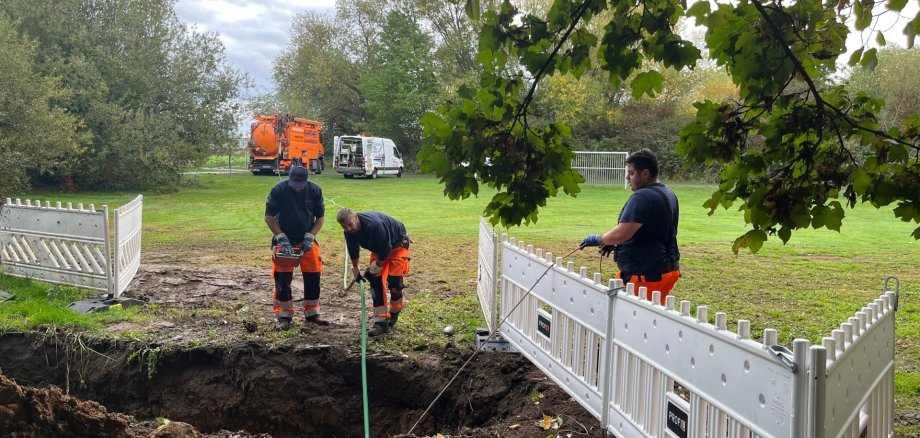
Die Bilder hat jeder im Kopf: Enten schwimmen nach längerem Regen munter auf dem Bolzplatz an der Abzweigung der B8 in Richtung Etwashausen. Damit ist künftig Schluss: Mitarbeiter des Bauhofes reparieren dieser Tage zusammen mit einer externen Firma das marode Kanalsystem. Von dort ist das Wasser bei größeren Niederschlägen auf die Wiese geschossen und hat den kleinen Fußballplatz unter Wasser gesetzt. Die alten Kanäle sind bereits entnommen, der Sandfang gereinigt worden. Die umliegenden Kanalsysteme werden nun ebenfalls gereinigt und dann kann es mit der Verlegung des neuen Kanalsystems losgehen. In etwa zwei Wochen dürften die Arbeiten abgeschlossen sein. Die Enten können sich schon einmal nach einem anderen Ort zum Schwimmen umschauen.

Help with accessibility

  • General

    We endeavour to make our website accessible. You can find details on this in our accessibility statement. You can send us suggestions for improvement via our feedback form Report accessibility.

  • Font size

    To adjust the font size, please use the following key combinations:

    Larger

    ⌘command
    +

    Smaller

    ⌘command
    –

    Larger

    Ctrl
    +

    Smaller

    Ctrl
    –
  • Keyboard navigation

    Use TAB and SHIFT + TAB to navigate through next/previous links, form elements, and buttons.

    Use ENTER to open links and interact with elements.

  • Contrast mode

    Press the following key combination to reduce or increase the contrast:

    Enlarge

    ⌃control
    ⌥option
    ⌘command
    .

    Decrease

    ⌃control
    ⌥option
    ⌘command
    ,
    Note: The shortcuts must be activated in the system settings of the operating system.

    Press the left ALT key + left SHIFT key + PRINT to quickly turn high contrast mode on or off.

  • Invert colours

    Press the following key combination to switch the colour inversion on and off:

    ⌃control
    ⌥option
    ⌘command
    8
    Note: The shortcuts must be activated in the system settings of the operating system.

    First activate the screen magnifier and then switch the colour inversion on and off with the following key combinations:

    1. screen magnifier

    +

    2. invert colours

    Ctrl
    Old
    I
  • Screen magnifier

    Press the following key combinations to use the screen magnifier:

    Switch on/off

    ⌥option
    ⌘command
    8

    Enlarge view

    ⌥option
    ⌘command
    =

    Zoom out view

    ⌥option
    ⌘command
    –
    Note: The shortcuts must be activated in the system settings of the operating system.

    Switch on / Enlarge view

    +

    Zoom out view

    –