Diese Seite wurde automatisch übersetzt. Es kann daher zu Abweichungen oder Ungenauigkeiten im Text kommen. Verbindlich ist ausschließlich die Originalfassung. Rechtsansprüche aus Inhalten der übersetzten Version sind ausgeschlossen.

Good deed

Freemasons in Kitzingen donate a tree

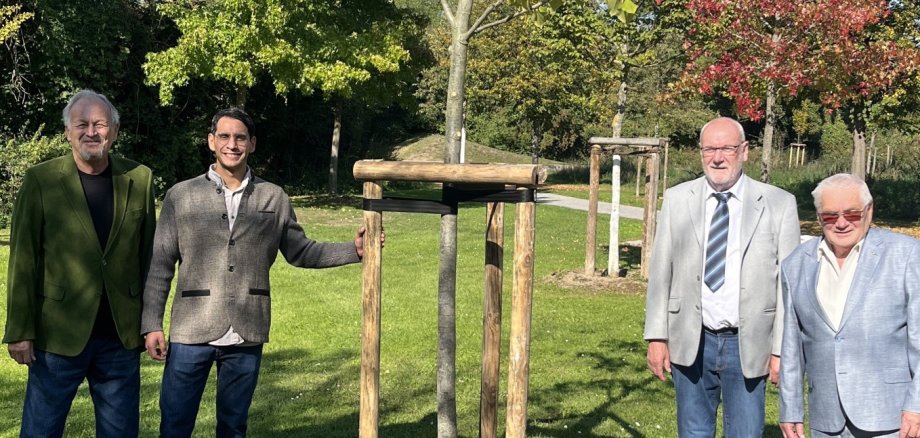
They want to support Kitzingen and ensure that donations are used in a targeted and local manner. Members of the Kitzingen Masonic Lodge ‘Thekla – a beacon in Franconia’ have recently planted a lime tree on the grounds of the garden show. Further donations are to follow.

Heinz Menninga is the head of the association, which has existed in Kitzingen for exactly 100 years. In 1933, the lodge disbanded of its own accord due to political developments; in 1946, it resumed its work with the approval of the American armed forces. This included, for example, actively supporting the ‘Lebenshilfe’ charity when it was founded in 1965. Heinz Menninga describes the aim of the lodge’s current 20 members as follows: “We work on ourselves and want to become better people.” To this end, the members – who address one another as ‘brothers’ – meet regularly at their clubhouse on Mainstockheimer Straße. Anyone interested is warmly invited to the monthly guest evenings. (More information at www.freimaurer-kitzingen.de) Through talks, wine tastings and other events, the Kitzing Freemasons aim to raise their public profile and dispel prejudices. “There are simply too many false claims circulating about us,” laments Heinz Menninga. During the tree-planting ceremony, Lord Mayor Dr Enis Tiz emphasised that any democratic and liberal-minded organisation can and should, of course, be part of the local community and its development. He was delighted with the tree and the ‘Brothers’ announcement that they would be making a donation next year to equip Kitzingen’s classrooms with air-conditioning units.

Help with accessibility

  • General

    We endeavour to make our website accessible. You can find details on this in our accessibility statement. You can send us suggestions for improvement via our feedback form Report accessibility.

  • Font size

    To adjust the font size, please use the following key combinations:

    Larger

    ⌘command
    +

    Smaller

    ⌘command
    –

    Larger

    Ctrl
    +

    Smaller

    Ctrl
    –
  • Keyboard navigation

    Use TAB and SHIFT + TAB to navigate through next/previous links, form elements, and buttons.

    Use ENTER to open links and interact with elements.

  • Contrast mode

    Press the following key combination to reduce or increase the contrast:

    Enlarge

    ⌃control
    ⌥option
    ⌘command
    .

    Decrease

    ⌃control
    ⌥option
    ⌘command
    ,
    Note: The shortcuts must be activated in the system settings of the operating system.

    Press the left ALT key + left SHIFT key + PRINT to quickly turn high contrast mode on or off.

  • Invert colours

    Press the following key combination to switch the colour inversion on and off:

    ⌃control
    ⌥option
    ⌘command
    8
    Note: The shortcuts must be activated in the system settings of the operating system.

    First activate the screen magnifier and then switch the colour inversion on and off with the following key combinations:

    1. screen magnifier

    +

    2. invert colours

    Ctrl
    Old
    I
  • Screen magnifier

    Press the following key combinations to use the screen magnifier:

    Switch on/off

    ⌥option
    ⌘command
    8

    Enlarge view

    ⌥option
    ⌘command
    =

    Zoom out view

    ⌥option
    ⌘command
    –
    Note: The shortcuts must be activated in the system settings of the operating system.

    Switch on / Enlarge view

    +

    Zoom out view

    –